
Feature Toggles
Enable or disable platform features like wells, job portal, and intelligence modules.
Access feature toggles
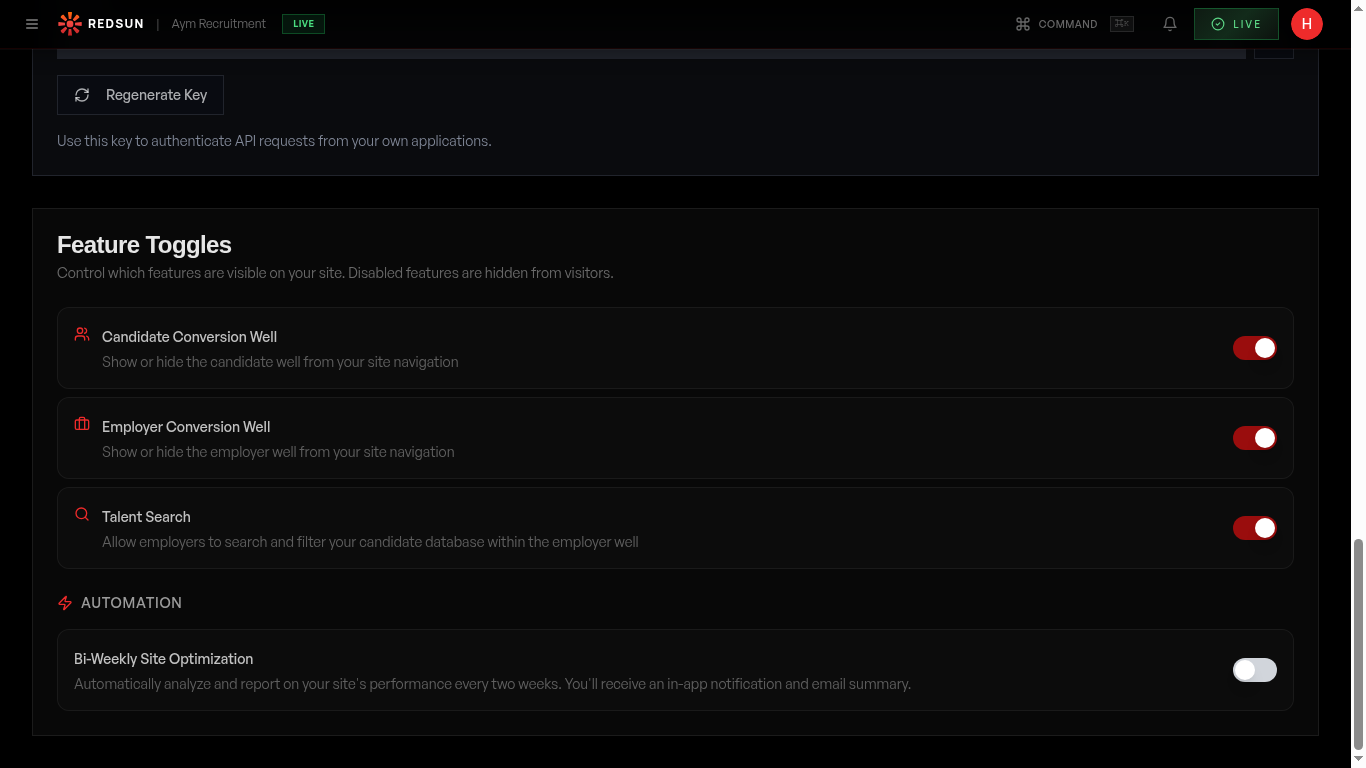
Click the '...' (More tools) icon in the top navigation bar, then select 'Connections'. Scroll down to the Feature Toggles panel below the CRM Integration section.
Understand the toggles
Feature toggles are master switches that control whether features appear on your live site: • **candidate_form** — Candidate Well (CV upload and career insights) • **hiring_dashboard** — Employer/Hiring Well (role submission and hiring intelligence) • **job_portal** — Job listings page • **visitor_intelligence** — Visitor tracking and intent scoring (Fusion only) • **microsites** — Sector microsite generation (Fusion only) Toggling a feature off immediately removes it from your live site. Data is preserved — re-enabling restores everything.
Toggle a feature
Click any toggle switch to enable or disable the feature. Changes take effect on your next publish. A confirmation dialog appears for disabling to prevent accidental removal.
Feature toggles work alongside builder toggles. Both the feature toggle (Connections) AND the builder toggle (Wells tab) must be on for wells to appear.
Tier-gated features
Some toggles are only available on certain plans. Fusion-only features show a 'Fusion' badge. Clicking a locked toggle opens an upgrade prompt with a direct link to billing.
Guide complete
You've covered all 4 steps. Check out the related guides below.
Still need help?
Our support team is here to assist you.