
Known Visitors Table
View and manage identified visitors to your site.
Access visitor intelligence
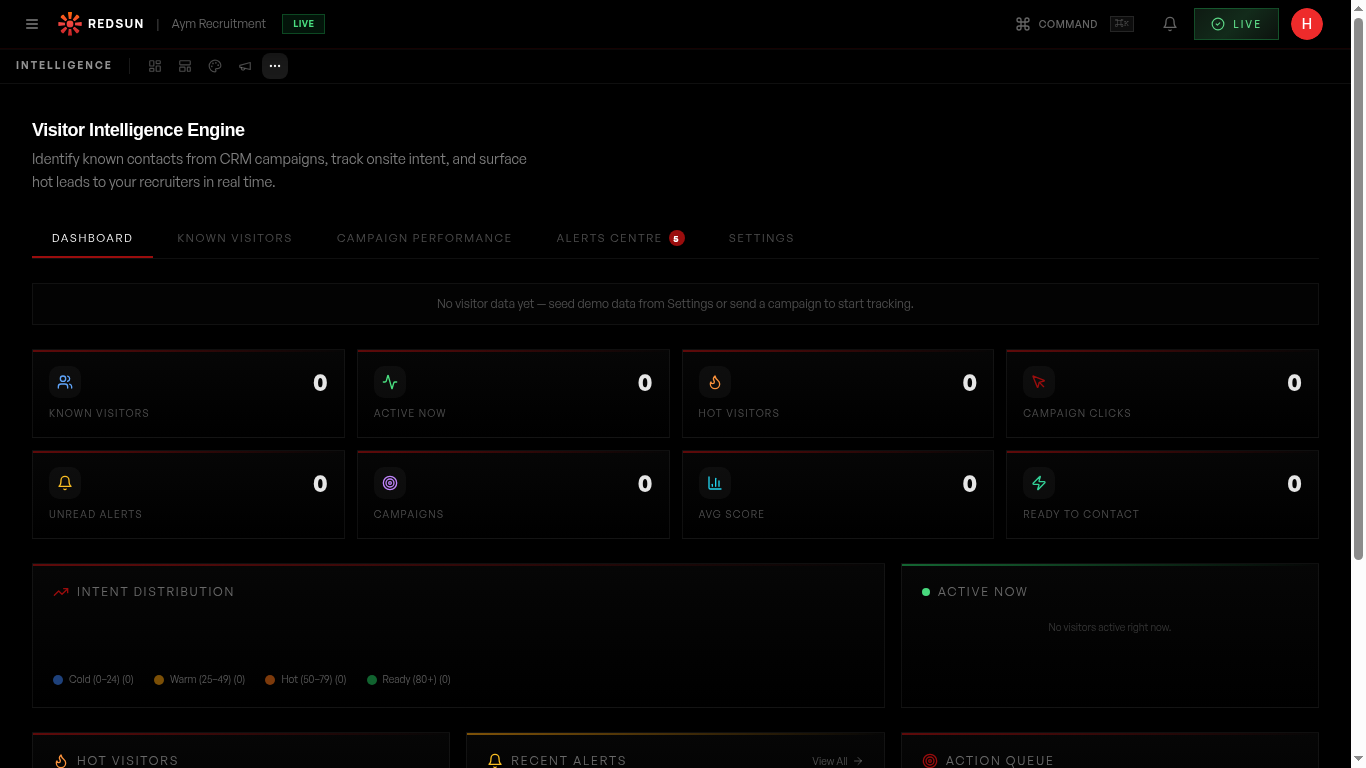
Click the '...' (More tools) icon in the top nav and select 'Intelligence'. The dashboard shows headline metrics: Known Visitors, Active Now, Hot Visitors, Campaign Clicks, and more.
Understand the table
Click the 'KNOWN VISITORS' tab to see a table of everyone identified through form submissions, campaign clicks, or CRM matches. Each row shows: visitor name, company, visit count, last seen date, intent score, and tier classification.
Filter and search
Use the search bar and filters to find specific visitors by name, company, intent tier, or date range. Sort by any column to prioritise your outreach.
Sort by 'Last Seen' descending to find recently active visitors — they're the warmest leads.
Take action
From the visitor table, you can: view their full journey, assign them to a team member, add notes, or trigger a re-engagement email.
Guide complete
You've covered all 4 steps. Check out the related guides below.
Still need help?
Our support team is here to assist you.