
Connecting a Custom Domain
Point your own domain (e.g. www.youragency.com) to your Redsun site.
Navigate to domain settings
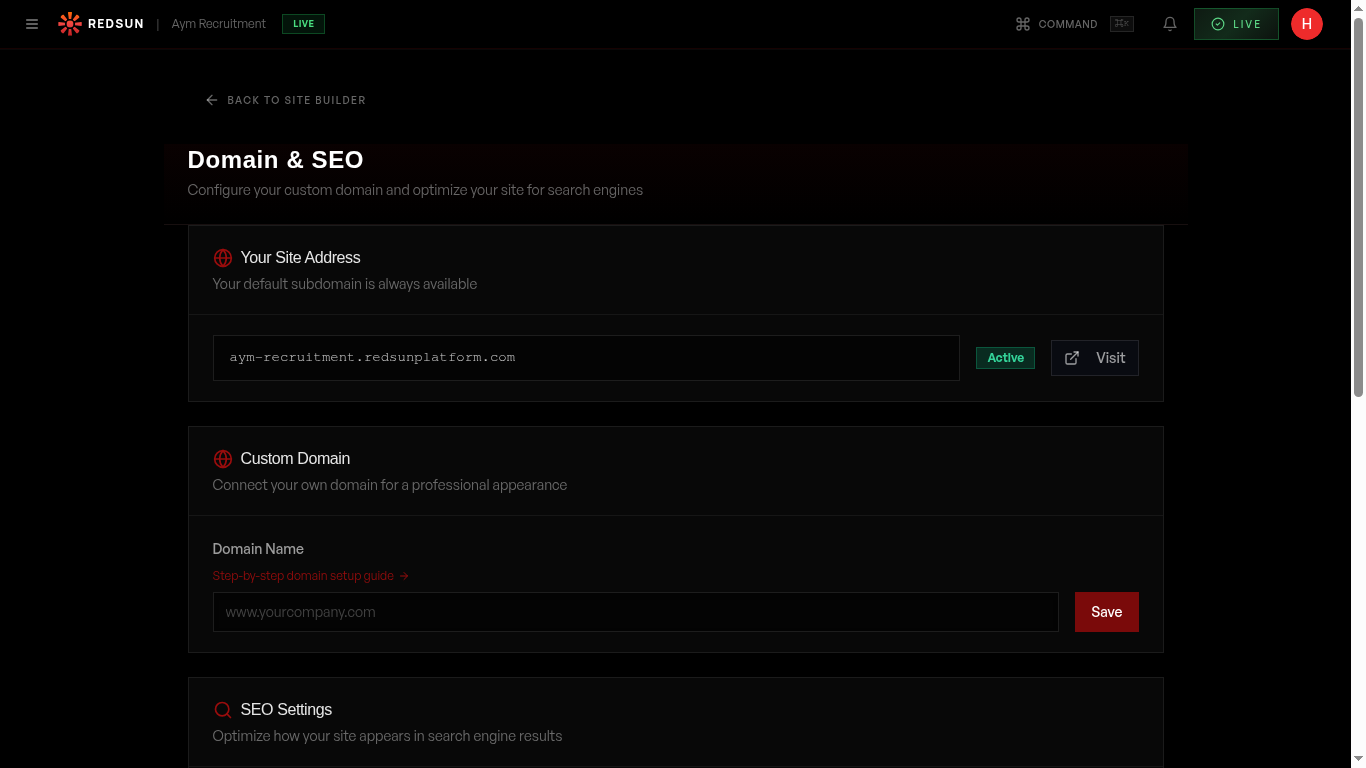
Go to Settings → Domain in your dashboard. You'll see your current Redsun subdomain (e.g. youragency.redsunplatform.com) and the custom domain configuration section.
Domain settingsEnter your domain
Type your custom domain into the field (e.g. www.youragency.com or careers.youragency.com). Redsun supports both root domains and subdomains. Click 'Save' to register the domain.
Update your DNS records
Redsun displays the DNS records you need to add at your domain registrar (GoDaddy, Cloudflare, Namecheap, etc.): • **CNAME record** — Point your domain to `proxy.redsunplatform.com` • **TXT record** — A verification record to prove domain ownership Copy the values shown and add them in your registrar's DNS management panel.
DNS changes can take up to 48 hours to propagate, but most complete within 1–2 hours. Don't panic if it doesn't work immediately.
Verify and activate
Click 'Verify Domain' once you've added the DNS records. Redsun checks that the CNAME and TXT records are correctly configured. Once verified, your custom domain goes live and SSL is provisioned automatically.
SSL certificate
Redsun automatically provisions and renews a free SSL certificate for your custom domain via Let's Encrypt. The certificate activates within minutes of domain verification. Your site is served over HTTPS with no additional configuration.
Redirect settings
Once your custom domain is active, visitors to your Redsun subdomain are automatically redirected to your custom domain. You can also configure www ↔ non-www redirects from the domain settings.
Guide complete
You've covered all 6 steps. Check out the related guides below.
Still need help?
Our support team is here to assist you.